


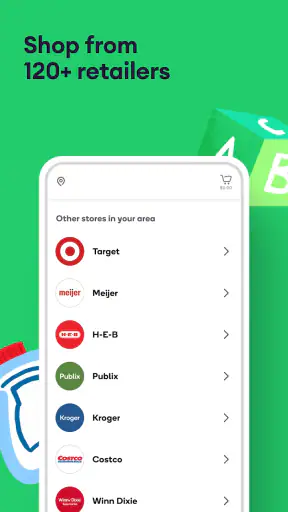

Ordering groceries from a phone sounds simple until the task happens with a tired child nearby, limited mobility, a noisy kitchen, or very little time before dinner. I tested Shipt: Order Grocery Delivery with those everyday situations in mind, rather than treating it as just another shopping app. It is a free Food & Drink app from Shipt that brings grocery and retail ordering into one place, with delivery options from more than 120 stores and support for same-day and express orders.
My overall impression is that the app is most useful when leaving home is difficult or when a normal shopping trip would consume more energy than the groceries are worth. The basic flow is familiar: choose a store, search for items, review the basket, select a delivery window, and place the order. That familiarity helps, but the real question is whether the experience remains manageable for people with different abilities and in different surroundings. In my use, it generally does, although the final experience still depends heavily on the selected store, the available delivery window, and how carefully I review substitutions.
The app has been available since April 6, 2015, and its current version is 2.306.0. It carries an Everyone age rating, requires Android 8.0 or later, and has passed the one-million-install mark. A 4.5 average from roughly 42 thousand ratings suggests that many shoppers find the service dependable enough to keep using, while about 11 thousand written reviews show that people have plenty to say about their experiences. Those figures do not replace personal testing, but they do place the app among established grocery-delivery choices rather than experimental software.
How Shipt handles readability, navigation, and different ways of shopping
A familiar path makes the first order less intimidating
The strongest accessibility decision is not a flashy feature; it is the straightforward structure. I can begin with a store instead of trying to understand a complicated home screen, then move through product search and the basket in a predictable order. For someone who does not regularly use delivery apps, this matters. The fewer decisions I have to decode before finding milk, medicine-cabinet basics, or cleaning supplies, the less tiring the task becomes.
Search is especially helpful for shoppers who cannot comfortably browse long aisles on a small screen. I can look for a specific product rather than repeatedly scanning shelves. That is also useful for people with attention difficulties: a planned list can become a sequence of focused searches instead of an open-ended shopping trip. I recommend searching by the everyday name I would use in a store, then checking the product details and size before adding it. A familiar brand name alone is not enough when multiple package sizes appear together.
The basket deserves a deliberate review. I use it as a second pass, checking quantities, sizes, and the store associated with each item before moving on. This is a practical accessibility habit because correcting an overlooked item after the order is submitted can require extra communication and more mental effort. The app makes ordering convenient, but convenience should not encourage rushing through the last screen.
Readable does not always mean effortless
On a phone, grocery images and product names can create a crowded browsing experience. I found search more comfortable than exploring every category, particularly when I was working with a short attention span or a small display. People who use screen magnification may also prefer targeted searches because fewer products need to be examined at once. The app is easier to navigate when I treat it as a list-building tool rather than a digital version of wandering through a supermarket.
Text size, contrast, and spoken output can vary with the device and operating system, so I would not assume that every screen will be equally comfortable for every reader. Anyone who relies on larger text should check the app on their own phone before committing to a large order. I also suggest using the device’s usual accessibility settings and taking extra time on product labels, quantities, and checkout details. The app’s simple sequence helps, but it cannot remove every challenge created by a small screen.
One useful workflow is to prepare a repeatable shopping note outside the app, grouped into sections such as breakfast, fresh food, household items, and personal care. I then search those items one group at a time. This reduces the chance of forgetting something when visual browsing is tiring, and it makes the order easier to review later. It is not an extra feature that needs to be learned; it is a way of adapting the app’s search-first experience to the way I already organize information.
Store choice changes the experience
Shipt is not a single supermarket with a single inventory. It connects shoppers with grocery and retail stores, so the selection and ordering experience can change depending on where I shop. That variety is a strength when one nearby store lacks a needed item, but it also means I should not expect identical product names, packaging, or availability from one store to another.
For accessibility, this has an important consequence: the best store is not always the one with the largest selection. I may prefer a store whose product names are clearer, whose familiar items are easier to locate, or whose delivery window fits my energy level. If I am ordering for someone else, I also consider whether the recipient can recognize the chosen packaging. A technically available substitute may still be a poor practical choice if the person cannot easily identify it.
Motor, sensory, and situational access in real use
Reducing physical effort is the app’s clearest benefit
For people with limited mobility, chronic pain, fatigue, or temporary injury, the central advantage is obvious: the app moves much of the shopping process from a physical store to a phone. I do not need to reach high shelves, push a cart, stand in a checkout line, or carry several bags home. That can turn an exhausting errand into a manageable planning task.
I found this particularly valuable for heavy or awkward purchases. Even when I could technically carry them, avoiding the lifting and transport made the whole day easier. The same applies to caregivers who cannot leave someone alone, parents managing a sleeping child, and people recovering from illness. Same-day delivery can be useful when planning ahead was not possible, while express delivery is relevant when the need is immediate. I still treat those options as convenience tools rather than guarantees that every item will arrive exactly when I want it.
A realistic example is a weekday evening when I realize that dinner ingredients and household essentials are missing, but going to the store would mean navigating traffic, parking, aisles, checkout, and carrying everything back. I can use Shipt to search for the essentials, review the basket from home, and choose a delivery option that fits the situation. If an item is unavailable, I have more time to decide whether a substitute is acceptable than I might have while standing in a crowded aisle.
Less sensory pressure, but more screen-based work
Shopping from home can remove several sensory obstacles: bright store lighting, background music, crowded aisles, strong smells, and unpredictable noise. For an autistic shopper or someone who becomes overwhelmed in busy environments, that change may be more important than speed. I can pause, leave the app, and return to the order without physically remaining in an uncomfortable place.
At the same time, the app does not make grocery shopping sensory-neutral. Product photos, scrolling, notifications, and dense screens can still be tiring. A person with visual sensitivity may prefer a simple, planned order rather than browsing. Someone with hearing loss may appreciate that the main task is visual, but should still pay close attention to any order communication that affects substitutions or timing. A shopper with cognitive fatigue may benefit from placing smaller orders, reviewing one category at a time, and avoiding last-minute changes.
I also think about sensory needs at delivery. A person who cannot tolerate an unexpected knock, a barking dog, or a rushed handoff may need another household member to receive the order or may prefer a delivery period when the home is calmer. The app can reduce the stress of entering a store, but it does not control everything that happens at the door.
Voice input and device settings can help, with limits
People who have difficulty typing can try their phone’s built-in voice input for product searches. I found this most useful for short, specific searches, such as a brand and product type. Voice recognition can mishear names, sizes, or unusual food terms, so I always verify the result visually before adding it. This is a good example of assistive technology helping with the motor demand without removing the need for careful checking.
Likewise, device-level screen readers, magnification, and larger text may improve access, but the result can vary across screens and store catalogs. I would test a small basket first if I rely on those tools. An app can be usable in its main navigation and still become harder to interpret when product descriptions, images, or checkout elements are presented differently.
Delivery windows solve some problems and create others
Delivery timing is more than a convenience feature for many users. Someone with fluctuating energy may choose a period when assistance is available. A caregiver may need the order to arrive while another adult is home. A person with anxiety may want enough notice to prepare for the interaction. Same-day and express choices give the service practical flexibility, but the right option depends on what the available store inventory and schedule offer at that moment.
I would not build a critical medical or dietary plan around one delivery without a backup. Grocery availability can change, and a substitute may not meet a strict allergy, texture, religious, or medical requirement. For those needs, I recommend ordering earlier when possible, checking every item carefully, and keeping a safe alternative at home. This is not a criticism unique to Shipt; it is a basic trade-off of having another person select items for me.
Where the inclusive experience still has friction
Substitutions require judgment that the app cannot perform for me
The biggest barrier is the gap between finding an item on a screen and receiving the exact item I need. A substitute that looks close in name may differ in ingredients, size, texture, or packaging. That matters to people with allergies, diabetes, sensory sensitivities, swallowing concerns, or strict routines. I treat every replacement as a decision point, not an automatic improvement.
For a flexible household, a substitute can save a meal. For someone with a narrow diet, it can make the order unusable. My practical approach is to choose products with clear alternatives in mind before checkout and to review communications promptly during the shopping process. If another person is receiving the order, I explain the acceptable options in advance. This reduces the burden on the shopper and avoids a stressful conversation at the door.
Small-screen precision remains important
People with tremors, reduced dexterity, or one-handed phone use may find repeated tapping and scrolling tiring. The order itself may be simple, but shopping for many items still involves precise selection. I would rather place two carefully reviewed orders than one rushed order that contains wrong sizes or duplicates. Using a stable surface, increasing device text size, and searching for exact items can make the process less physically demanding.
That approach has a trade-off: splitting an order may take more time and may not be as efficient as completing everything together. It can nevertheless be the better choice when fatigue or accuracy is the main concern. Shipt is strongest when I adapt the workflow to my capacity instead of trying to imitate a fast supermarket trip.
It is not the right answer for every shopping need
I would skip this kind of service when I need to inspect produce personally, compare several fresh items by touch, or make spontaneous discoveries in a store. I may also prefer a local shop, pickup service, or an in-person helper when delivery timing is uncertain or when I need complete control over substitutions. Pickup can be better for someone who can drive but wants to avoid aisles and checkout, while a traditional trip may be cheaper or more satisfying for a shopper who enjoys choosing every item.
The app is also less suitable for people who dislike managing orders on a phone. If a family member or support person must place every order on someone else’s behalf, the convenience may depend on that helper’s availability. In that situation, a shared household routine and a written list may be more reliable than expecting one person to monitor the entire process remotely.
My inclusive verdict after using it as more than a delivery shortcut
I see Shipt as a practical access tool disguised as a grocery app. Its value is not limited to saving a trip; it can reduce standing, carrying, sensory overload, and the planning pressure of navigating a store. The broad choice of grocery and retail stores makes it useful for households with different routines, and same-day or express delivery can help when ordinary planning breaks down.
Its inclusive strengths are clearest for people who can use a phone comfortably but find physical shopping difficult. It also suits caregivers, busy households, people avoiding crowded environments, and anyone who benefits from building an order in a quiet room. The service is free to install, and the Everyone rating makes it broadly approachable as an app, although the real suitability still depends on the user’s device, store options, delivery situation, and ability to review substitutions.
I would recommend starting with a small, low-risk order. Search for familiar products, check sizes in the basket, choose a delivery period that does not create pressure, and decide in advance which substitutions are acceptable. That first test reveals more than a long feature list: it shows whether the app’s text, navigation, store selection, and delivery communication work for the person who will actually use it.
The most important lesson is to treat accessibility as a complete routine, not a single app feature. Shipt can remove major physical and sensory barriers, but it cannot decide whether a substitute is safe, make every screen equally comfortable, or guarantee that a delivery fits an unpredictable day. With a careful workflow, I find it genuinely helpful and worth recommending to friends who want grocery delivery without giving up control over the order. For shoppers who need absolute product certainty or who prefer hands-on selection, another method may still be the better fit.
Shipt is developed by Shipt, and its long presence in the Food & Drink category gives it a reassuringly established feel. I would choose it when avoiding a store is the main goal and when I have enough time to review what I am buying. I would not choose it blindly for strict dietary needs or an urgent item with no backup. Used with those limits in mind, Shipt: Order Grocery Delivery is a thoughtful, flexible option for making an ordinary grocery task more reachable in real life.


